
Last updated on
Oct 31, 2026
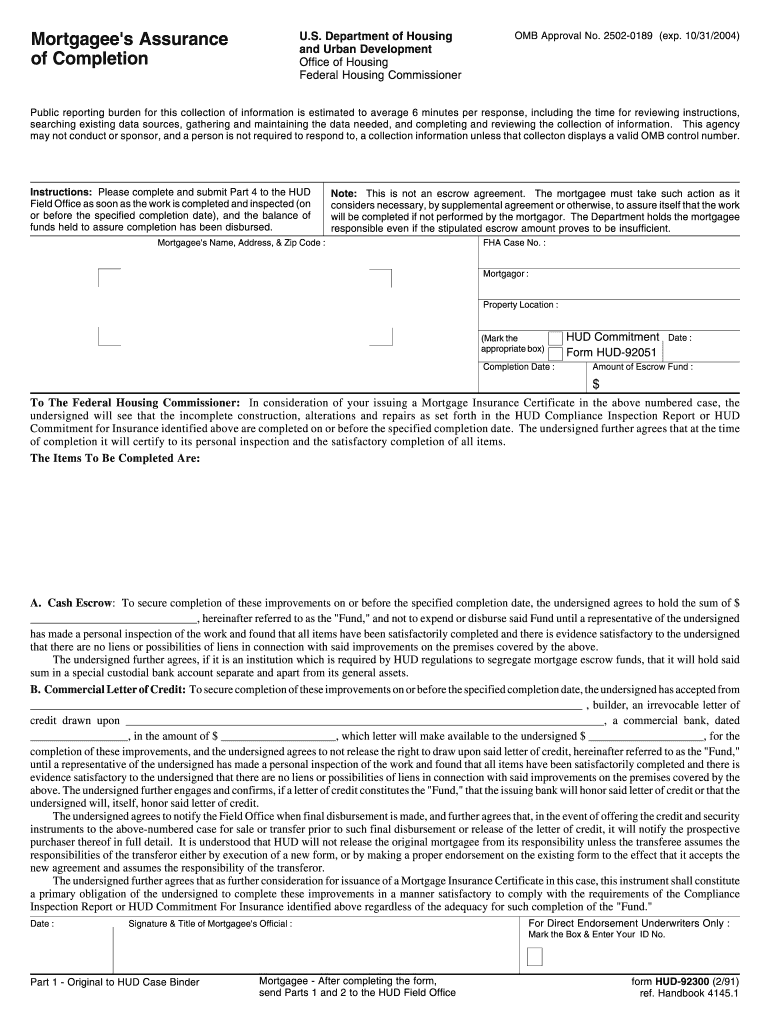
Get the free Mortgagee's Assurance Form HUD-92051
We are not affiliated with any brand or entity on this form

Fill out
Complete the form online in a simple drag-and-drop editor.

eSign
Add your legally binding signature or send the form for signing.

Share
Share the form via a link, letting anyone fill it out from any device.

Export
Download, print, email, or move the form to your cloud storage.
Why pdfFiller is the best tool for your documents and forms


End-to-end document management
From editing and signing to collaboration and tracking, pdfFiller has everything you need to get your documents done quickly and efficiently.
Accessible from anywhere
pdfFiller is fully cloud-based. This means you can edit, sign, and share documents from anywhere using your computer, smartphone, or tablet.
Secure and compliant
pdfFiller lets you securely manage documents following global laws like ESIGN, CCPA, and GDPR. It's also HIPAA and SOC 2 compliant.
What is Mortgagee's Assurance Form HUD-92051
The Mortgagee's Assurance Form HUD-92051 is a government form used by mortgagees to certify the completion of construction and repairs as outlined in HUD documentation.
pdfFiller scores top ratings on review platforms




This app is incredibly easy to use, very accurate,
great service and works great i would use again in the future
Who needs Mortgagee's Assurance Form HUD-92051?
Explore how professionals across industries use pdfFiller.

Mortgagee's Assurance Form HUD-92051 is needed by:
-
Mortgage lenders ensuring compliance with HUD regulations
-
Construction companies involved in FHA insured projects
-
Property developers needing assurance of project completion
-
Real estate professionals managing HUD related transactions
-
Homeowners requesting FHA financing
Comprehensive Guide to Mortgagee's Assurance Form HUD-92051
What is the Mortgagee's Assurance Form HUD-92051?
The Mortgagee's Assurance Form HUD-92051 is a crucial document issued by the U.S. Department of Housing and Urban Development (HUD). Its primary significance lies in ensuring that construction, alterations, and repairs adhere to the specifications outlined in the HUD Compliance Inspection Report or HUD Commitment for Insurance. This form serves as a certification of work completion and is essential for complying with HUD's regulations.
The purpose of this form is to provide a formal mechanism for mortgagees to assure that all mandated work on properties is finalized by the designated completion date. It encapsulates aspects of compliance that are critical for mortgage approval and overall project financing.
Purpose and Benefits of the Mortgagee's Assurance Form HUD-92051
This form offers several benefits to both mortgagees and property owners. It guarantees the satisfactory completion of construction projects, thereby protecting the financial interests of both parties involved. By using the form, mortgagees can fulfill escrow requirements, enabling a seamless flow of funds while ensuring that work meets HUD's standards.
-
Acts as a security measure for project completion
-
Protects the interests of mortgagees and property owners
-
Essential for compliance in financing scenarios
Who Needs the Mortgagee's Assurance Form HUD-92051?
The primary users of the Mortgagee's Assurance Form HUD-92051 include mortgagees and developers. Mortgagees oversee the funding and construction process, while developers are responsible for executing the construction and repairs. Furthermore, other stakeholders such as government agencies and borrowers play significant roles in the effective management of the form.
These users must ensure all relevant sections are completed accurately for the process to move forward smoothly. Understanding the responsibilities associated with this form is essential for all parties involved in real estate transactions.
How to Fill Out the Mortgagee's Assurance Form HUD-92051 Online
Filling out the Mortgagee's Assurance Form HUD-92051 online can be accomplished smoothly by following these steps:
-
Access the form through pdfFiller’s platform.
-
Fill in the 'Mortgagee's Name, Address, & Zip Code' fields.
-
Enter the 'FHA Case No.' and other pertinent details like 'Mortgagor' and 'Property Location'.
-
Specify the 'Completion Date' and 'Amount of Escrow Fund'.
-
Review all entered information for accuracy before submission.
Utilizing pdfFiller aids in the efficient completion and submission of this form, reducing errors and enhancing the overall user experience.
Common Errors and How to Avoid Them
When filling out the Mortgagee's Assurance Form HUD-92051, several common errors can occur:
-
Omitting mandatory signatures
-
Incorrectly inputting the FHA Case No.
-
Failing to provide accurate escrow amounts
To avoid these mistakes, carefully validate all information before submission. Checking for completeness ensures that the form is processed promptly, mitigating the risks of delays or rejections that could arise from errors.
Submission Methods and Delivery for the Mortgagee's Assurance Form HUD-92051
The HUD-92051 form can be submitted through various methods. Mortgagees have the option to submit the form online via the HUD portal or through traditional mail. It is imperative to adhere to any deadlines set by HUD and to include required additional documents to avoid potential processing issues.
-
Choose between online submission or mailing the form
-
Confirm submission deadlines
-
Include all necessary supporting documents for your submission
Tracking submissions is also vital to ensure receipt by HUD, which can facilitate timely follow-ups and prevent any unnecessary complications.
Fees, Deadlines, and Processing Time
Filing the Mortgagee's Assurance Form HUD-92051 may incur certain fees, which vary by situation. Typically, costs associated with the form can include processing fees. Mortgagees should also be aware of potential waivers that may apply based on specific circumstances.
Understanding processing times after submission is crucial, as timely submissions help avoid penalties. It is advisable to plan accordingly, ensuring all paperwork is submitted within the designated timeframe.
What Happens After You Submit the Mortgagee's Assurance Form HUD-92051?
Once the Mortgagee's Assurance Form HUD-92051 is submitted, various next steps unfold. HUD will undertake inspection and verification actions to ensure compliance with the submitted information. Engaging with HUD regarding follow-up inquiries can aid in tracking your application status efficiently.
It is vital to maintain records related to the submission, as they serve as proof of compliance and completion of required steps.
Security and Compliance for Handling the Mortgagee's Assurance Form HUD-92051
Handling sensitive information when working with the Mortgagee's Assurance Form HUD-92051 necessitates a strong focus on security. Tools like pdfFiller utilize high-level encryption and adhere to compliance regulations, including HIPAA and GDPR, ensuring your data remains secure.
-
Employ 256-bit encryption for document security
-
Follow best practices for managing sensitive documents
-
Ensure compliance with relevant privacy regulations
Optimize Your Experience with pdfFiller for the Mortgagee's Assurance Form HUD-92051
pdfFiller significantly enhances the experience of filling out the Mortgagee's Assurance Form HUD-92051. Users can benefit from a range of features, including eSigning, document sharing, and secure storage options, streamlining the entire process.
Leveraging pdfFiller's capabilities not only simplifies form completion but also offers a secure environment for managing sensitive documents, ensuring compliance and efficiency throughout.
How to fill out the Mortgagee's Assurance Form HUD-92051
-
1.Access the Mortgagee's Assurance Form HUD-92051 on pdfFiller by using the search function or navigating through the government forms category.
-
2.Once you have opened the form, familiarize yourself with the layout, identifying sections for the mortgagee’s information, property details, and escrow specifications.
-
3.Before starting, gather all necessary information, including the mortgagee's name, address, FHA case number, mortgagor's details, property location, and anticipated completion date.
-
4.Begin filling in the blank fields; start with the mortgagee's name and address, followed by the FHA case number. Ensure accuracy as this information is critical.
-
5.Continue completing the sections for the property location and completion date. Input the necessary details regarding the escrow fund as necessary.
-
6.Navigate through the form using pdfFiller's fillable features, ensuring each section is adequately addressed according to the provided instructions.
-
7.Review the completed form thoroughly for any missing fields or inaccuracies before final submission.
-
8.Upon finalization, utilize the save feature on pdfFiller to store your form or download it for physical submission.
-
9.If applicable, submit the completed form directly through pdfFiller's available submission options, ensuring adherence to HUD's submission guidelines.

Who is eligible to use the Mortgagee's Assurance Form HUD-92051?
The form is designed for mortgagees involved in HUD-insured financing projects. Any mortgage lender or financial institution responsible for ensuring compliance with HUD regulations can use this form.
What is the deadline for submitting this form?
While specific deadlines may vary based on project timelines, the form must typically be submitted to HUD prior to the completion date specified in the related compliance documentation.
How do I submit the Mortgagee's Assurance Form HUD-92051?
Once completed, the form must be submitted to HUD. This can be done via mail or electronically, according to HUD submission guidelines. Check the latest instructions for your submission method.
What supporting documents are required with this form?
Supporting documents may include proof of the escrow fund and any additional details relevant to the project's completion. Always refer to HUD's requirements for precise documents.
What are common mistakes to avoid when filling out the form?
Ensure all fields are filled out completely and accurately. Common mistakes include incorrect FHA case numbers, missing required signatures, and failure to review the details against HUD guidelines.
How long does processing take for this form after submission?
Processing times can vary based on the volume of submissions. Generally, expect a response from HUD within a few weeks, but it's advisable to check with HUD for specific timelines.
What if I need to make changes after submitting the form?
If changes are required, it’s best to contact HUD directly for guidance on amending submitted forms. Follow their process to avoid potential delays in the review.
Related Content
Related Forms


Related Catalogs
Get the latest insights from our blog



If you believe that this page should be taken down, please follow our DMCA take down process
here
.
This form may include fields for payment information. Data entered in these fields is not covered by PCI DSS compliance.